
If you work as a programmer, you’ll have found yourself many times in a situation where something isn’t working and you don’t know what’s going on. But the real problem comes when you don’t know how to figure out why.
From experience, I know it’s incredibly frustrating, but there are solutions: punching a cushion to vent, changing jobs, or waiting until you can say “a wizard did it”. They tend to be rather ineffective methods, though.
In this guide I’ll walk you through a systematic methodology for tackling and resolving 99% of the errors you’ll come across in your career as a programmer. Although it’s focused on programming, these principles apply to problem-solving in general.
What is an error?
The dictionary’s first definition reads: “A mistaken belief or false judgement.”
In programming we could say there are two main types of error:
It doesn’t do what it should
Our intention was to have a new feature and what we coded doesn’t meet the requirements. Either by a tiny bit or because it does absolutely nothing.
It crashes! Kaboom!
We’ve done something that throws an exception, a syntax error, etc., that means nothing works. And we’ve pushed it to prod, without testing it, without tests. Blank screen, alarm bells in the office and the client is already on the phone asking what’s going on and reminding us of their SLA. Cold sweats and panic set in.
It can also be something halfway: a new feature that causes a crash, an error we see locally and/or that doesn’t trigger the disaster described above, etc.
Is an error the same as a bug? Well, in a broad sense, sure, why not? If we want to be more precise then I don’t know, I don’t have all the answers, but this guide applies to both.
Goal: diagnose
We need to be very clear about what objective we’re after, because that’ll help us focus on it. And our objective, at least the main and most immediate one, isn’t to fix the error: our objective is to diagnose.
And we need a good diagnosis: it’s no use if it seems to be one thing and then turns out not to be. We have to make sure, to be certain that the illness the patient has is the one we think it is.
In our case, if we give them the wrong medicine we probably won’t finish off the patient, but we can lose plenty of time — ours or the business’s.
Once we’ve got a good diagnosis the solution will probably be trivial, or at least we’ll be able to give an estimate of the time required. But without a diagnosis we can’t even know how long it’ll take to fix it. Could be 1h, could be 100h.
All that said, let’s have a look at a series of methodologies for finding bugs and errors:

Verifying Axioms
What is an axiom in programming?
In mathematics, an axiom is an unprovable principle on which a theory is built. In programming, our “axioms” are the basic assumptions on which we build our code:
- The environment is configured correctly
- Dependencies are installed
- Permissions are right
- Versions are compatible
- Input data is valid
Why verify axioms:
- The most common errors tend to be in our basic assumptions
- It saves time by identifying fundamental problems
- It avoids hunting for complex solutions when the problem is simple
A practical example
Let’s say on a website we want a news block where we short-poll to replace it every x seconds if there’s new content. We get cracking and end up with slick code: maintainable, clean, even beautiful. The small problem is it doesn’t work.
We take a deep breath and start checking systematically:
- Is the JavaScript we wrote actually running?
- Is the call to our controller route / endpoint that returns the content actually being made?
- If it is being called, what does the route return? Is what it returns correct?
And so, one by one, we check and resolve the problems. Bear in mind it’s usually not just one error stopping things from working, but several or many. Errors are legion.

Divide and Conquer (Bisecting the problem)
This technique has let me pinpoint the problem really quickly countless times.
Bisection methodology:
- Identify base states:
- Known working state
- Known broken state
- Bisection process:
- Split the code/changes into two parts
- Check which half the error is in
- Repeat the process on the problematic half
Practical examples:
Bisecting code or features:
We strip out features/code, ideally 50%. If after removing it still fails the same way, it was in the part we didn’t remove. If it no longer fails, then the error was in the part we removed.
This technique is a concept and how you apply it depends on the system. A concrete example would be disabling modules/plugins:
- Disable them all
- We see the error no longer happens
- Enable half of them
- We see it does happen again.
- Disable half of the ones we just enabled.
- We see it no longer happens
- And so on until we identify the culprit.
- Then we can start doing the same within the code itself.
This isn’t always possible, since sometimes we have dependencies, and disabling one thing can break another. That doesn’t mean it’s not a good tool, but we need to bear it in mind.
Bisecting over time:
- Last working commit: 15th March
- Current error: 20th March
- Check the commit from 17th March
- If it works → Error is between the 17th and 20th
- If it fails → Error is between the 15th and 17th
- Finally, once we’ve pinpointed the exact commit, it’s easier to examine the changed code.
Git bisect
Git has a tool that automates this: git bisect. You give it a “good” commit and a “bad” commit and it does a binary search for you, dropping you on each midpoint commit so you can test it and tell it whether it works or fails.
git bisect start
git bisect bad                 # current commit is broken
git bisect good <good-sha>     # last commit that worked
# git drops you on the midpoint commit: test it and...
git bisect good                # or: git bisect bad
# repeat until git pinpoints the guilty commit
git bisect reset # back to the original stateSummary
Disable or roll back aggressively until you reach a state where it doesn’t fail. Then step back forward until it fails again and you’ll have the culprit.

Reading and Understanding the Error
Often the system will complain and tell us where it hurts. Let’s not be like Dr. House — listen to the patient, who in this case tends to lie less.
Can we even read the error?
The first thing of all is having access to the error. If the error is local, we should have set up the environment so we can see it on screen directly. If it’s in production, the error probably won’t be visible on screen, but we’ll be able to find it in some log file, monitoring system, etc.
If we have none of that and the problem isn’t urgent, drop the problem and go sort things out so you can see the errors. Essential. Working blind, everything gets exponentially harder. And if the problem is urgent, then drop the problem and go sort things out so you can see the errors. In case you didn’t catch it: always make sure you can see the errors.
The art of reading and understanding
Once we’ve got the error, our job is to pause for a moment, breathe calmly, and read it without rushing.
I’ll repeat and be specific: read it, process it, and understand it without rushing. Reading isn’t the same as processing.
Read the whole message
Read the whole message, not just the first line — except when the error message is also the stack trace, which can be miles long. Even then you have to learn to spot the key points of the stack trace and whether to read it top-to-bottom or the other way round. That depends on your programming language.
The website encountered an unexpected error. Please try again later.

Drupal\Core\Render\Component\Exception\InvalidComponentException: [url] NULL value found, but a string or an object is required. This may be because the property is empty instead of having data present. If possible fix the source data, use the |default() twig filter, or update the schema to allow multiple types./n[style] NULL value found, but an array or an object is required/n[classes] Array value found, but a string or an object is required in Drupal\Core\Theme\Component\ComponentValidator->validateProps() (line 203 of core/lib/Drupal/Core/Theme/Component/ComponentValidator.php).
Drupal\Core\Template\ComponentsTwigExtension->doValidateProps(Array, 'paltana:button') (Line: 110)
Drupal\Core\Template\ComponentsTwigExtension->validateProps(Array, 'paltana:button') (Line: 48)
__TwigTemplate_2d7b20eb5242809b7d6a6a82c8fed412->doDisplay(Array, Array) (Line: 387)
Twig\Template->yield(Array, Array) (Line: 343)
Twig\Template->display(Array) (Line: 358)
Twig\Template->render(Array) (Line: 35)
Twig\TemplateWrapper->render(Array) (Line: 1479)
Twig\Extension\CoreExtension::include(Object, Array, 'paltana:button', Array) (Line: 80)
__TwigTemplate_16612a3174921890aa8c974e16d0d909->block_paragraph(Array, Array) (Line: 431)
Twig\Template->yieldBlock('paragraph', Array, Array) (Line: 67)
__TwigTemplate_16612a3174921890aa8c974e16d0d909->doDisplay(Array, Array) (Line: 387)
Twig\Template->yield(Array, Array) (Line: 343)
Twig\Template->display(Array) (Line: 358)
Twig\Template->render(Array) (Line: 35)
Twig\TemplateWrapper->render(Array) (Line: 33)
twig_render_template('themes/custom/paltana/templates/paragraphs/paragraph--download.html.twig', Array) (Line: 348)
Drupal\Core\Theme\ThemeManager->render('paragraph', Array) (Line: 491)
Drupal\Core\Render\Renderer->doRender(Array) (Line: 504)
Drupal\Core\Render\Renderer->doRender(Array, ) (Line: 248)
Drupal\Core\Render\Renderer->render(Array) (Line: 484)
Drupal\Core\Template\TwigExtension->escapeFilter(Object, Array, 'html', NULL, 1) (Line: 228)
__TwigTemplate_73ced71a766ddc03c60ceb7d403a57c2___1427063222->block_content(Array, Array) (Line: 431)
Twig\Template->yieldBlock('content', Array, Array) (Line: 65)
__TwigTemplate_f07c1e4fdef9baa9d7498bea86a00caa->doDisplay(Array, Array) (Line: 387)
Twig\Template->yield(Array, Array) (Line: 208)
__TwigTemplate_73ced71a766ddc03c60ceb7d403a57c2___1427063222->doDisplay(Array, Array) (Line: 387)
Twig\Template->yield(Array) (Line: 63)
__TwigTemplate_73ced71a766ddc03c60ceb7d403a57c2->doDisplay(Array, Array) (Line: 387)
Twig\Template->yield(Array, Array) (Line: 343)
Twig\Template->display(Array) (Line: 358)
Twig\Template->render(Array) (Line: 35)
Twig\TemplateWrapper->render(Array) (Line: 33)
twig_render_template('modules/custom/omitsis_modular/templates/layout/layout--two-column-50-50.html.twig', Array) (Line: 348)
Drupal\Core\Theme\ThemeManager->render('layout__two_column_50_50', Array) (Line: 491)
Drupal\Core\Render\Renderer->doRender(Array, ) (Line: 248)
Drupal\Core\Render\Renderer->render(Array) (Line: 484)
Drupal\Core\Template\TwigExtension->escapeFilter(Object, Array, 'html', NULL, 1) (Line: 67)
__TwigTemplate_1a7e80336362474b950315ef947431b8->block_paragraph(Array, Array) (Line: 431)
Twig\Template->yieldBlock('paragraph', Array, Array) (Line: 50)
__TwigTemplate_1a7e80336362474b950315ef947431b8->doDisplay(Array, Array) (Line: 387)
Twig\Template->yield(Array, Array) (Line: 343)
Twig\Template->display(Array) (Line: 358)
Twig\Template->render(Array) (Line: 35)
Twig\TemplateWrapper->render(Array) (Line: 33)
twig_render_template('themes/custom/paltana/templates/paragraphs/paragraph--layout.html.twig', Array) (Line: 348)
Drupal\Core\Theme\ThemeManager->render('paragraph', Array) (Line: 491)
Drupal\Core\Render\Renderer->doRender(Array, ) (Line: 248)
Drupal\Core\Render\Renderer->render(Array) (Line: 484)
Drupal\Core\Template\TwigExtension->escapeFilter(Object, Array, 'html', NULL, 1) (Line: 73)
__TwigTemplate_d81c272727a5ab212b165d1f3c47fe86->doDisplay(Array, Array) (Line: 387)
Twig\Template->yield(Array, Array) (Line: 343)
Twig\Template->display(Array) (Line: 358)
Twig\Template->render(Array) (Line: 35)
Twig\TemplateWrapper->render(Array) (Line: 33)
twig_render_template('themes/custom/paltana/templates/field/field.html.twig', Array) (Line: 348)
Drupal\Core\Theme\ThemeManager->render('field', Array) (Line: 491)
Drupal\Core\Render\Renderer->doRender(Array) (Line: 504)
Drupal\Core\Render\Renderer->doRender(Array, ) (Line: 248)
Drupal\Core\Render\Renderer->render(Array) (Line: 484)
Drupal\Core\Template\TwigExtension->escapeFilter(Object, Array, 'html', NULL, 1) (Line: 97)
__TwigTemplate_3b4655940d9b39ac2c180506f10a25a0->doDisplay(Array, Array) (Line: 387)
Twig\Template->yield(Array, Array) (Line: 343)
Twig\Template->display(Array) (Line: 358)
Twig\Template->render(Array) (Line: 35)
Twig\TemplateWrapper->render(Array) (Line: 33)
twig_render_template('themes/custom/paltana/templates/content/page/node--page.html.twig', Array) (Line: 348)
Drupal\Core\Theme\ThemeManager->render('node', Array) (Line: 491)
Drupal\Core\Render\Renderer->doRender(Array, ) (Line: 248)
Drupal\Core\Render\Renderer->render(Array, ) (Line: 238)
Drupal\Core\Render\MainContent\HtmlRenderer->Drupal\Core\Render\MainContent\{closure}() (Line: 638)
Drupal\Core\Render\Renderer->executeInRenderContext(Object, Object) (Line: 231)
Drupal\Core\Render\MainContent\HtmlRenderer->prepare(Array, Object, Object) (Line: 128)
Drupal\Core\Render\MainContent\HtmlRenderer->renderResponse(Array, Object, Object) (Line: 90)
Drupal\Core\EventSubscriber\MainContentViewSubscriber->onViewRenderArray(Object, 'kernel.view', Object)
call_user_func(Array, Object, 'kernel.view', Object) (Line: 111)
Drupal\Component\EventDispatcher\ContainerAwareEventDispatcher->dispatch(Object, 'kernel.view') (Line: 186)
Symfony\Component\HttpKernel\HttpKernel->handleRaw(Object, 1) (Line: 76)
Symfony\Component\HttpKernel\HttpKernel->handle(Object, 1, 1) (Line: 53)
Drupal\Core\StackMiddleware\Session->handle(Object, 1, 1) (Line: 48)
Drupal\Core\StackMiddleware\KernelPreHandle->handle(Object, 1, 1) (Line: 28)
Drupal\Core\StackMiddleware\ContentLength->handle(Object, 1, 1) (Line: 32)
Drupal\big_pipe\StackMiddleware\ContentLength->handle(Object, 1, 1) (Line: 116)
Drupal\page_cache\StackMiddleware\PageCache->pass(Object, 1, 1) (Line: 90)
Drupal\page_cache\StackMiddleware\PageCache->handle(Object, 1, 1) (Line: 48)
Drupal\Core\StackMiddleware\ReverseProxyMiddleware->handle(Object, 1, 1) (Line: 51)
Drupal\Core\StackMiddleware\NegotiationMiddleware->handle(Object, 1, 1) (Line: 36)
Drupal\Core\StackMiddleware\AjaxPageState->handle(Object, 1, 1) (Line: 38)
Drupal\mercury_editor\StackMiddleware\AjaxPageState->handle(Object, 1, 1) (Line: 51)
Drupal\Core\StackMiddleware\StackedHttpKernel->handle(Object, 1, 1) (Line: 741)
Drupal\Core\DrupalKernel->handle(Object) (Line: 19)
The first thing one does when seeing something like that is panic. And then look only at the top, but what matters most is seeing where the error happens — line and file. Bear in mind that sometimes it’ll tell you an object instantiated in file x is using a method that doesn’t exist on a class defined in file y. So there’ll be several files involved.
Once you’ve identified the error, you have to think:
- Do I know what it’s referring to? Is custom code? → Get cracking and fix the error. These kinds of errors are usually silly little things we know how to fix — the hard part is identifying the error.
- Don’t know what it refers to? It’s contrib code from dependencies? → Time to search the internet or use AI. There’s more info on that later on.
In the example at the start it gives me a hint about what’s happening, but not where. If I keep going down I see something more familiar: “paltana:button”, and a bit further down “paragraph–download.html.twig”. Looks like something’s happening in the file paragraph–download.html.twig when calling the paltana:button component.

Effective Debugging
This section probably deserves its own post; here are just a few notes and reminders.
Real-time debugging always beats sprinkling print statements through the code. But the latter beats nothing. If it’s local, there should be no excuse for not having this option available. If it’s in other environments, you’ll need to fall back on other strategies. The first is to try and reproduce locally, as far as possible, what’s happening in the environment where we found the error: Docker, pulling and installing the database, etc.
If we can’t do that, then we can look at having a system to log messages, but we need to be very careful about the impact it can have. Systems like Grafana, Datadog or New Relic can help.
Once we can start debugging, it’s important to know where to put the breakpoints. If we put one on the first line of code, we can spend hours before reaching the spot where the error occurs. This part has to be combined with knowing where the error is happening (or where it isn’t working as it should), using one of the earlier strategies.
Once we’re on the spot, just before where the error occurs, it’s time to re-check axioms.
What value does this variable hold? Is it what I expected?
Does execution enter the parts of the code it should?
Does it return what it should return?

Searching the internet
It’s an obvious thing that we do every day, but even so some people find what they need quickly and others take longer. So we can say there are a few tricks that help us be more effective. Here are some:
Always put the name of the “thing” you develop in first, the most relevant one. For example, I develop in Drupal, so I always put Drupal first. Drupal runs on PHP, but unless I’m searching for a generic PHP error I’ll never include that.
Then always put the version — in my case, that would be Drupal 11.
Search for the exact error, using quotes, but with a few caveats:
How much of the error to include
Using as an example the mile-long error from before, which I’m not going to paste again so as not to crash the internet. We don’t want to copy the whole thing — what we want is to find what other people have said about their errors. So we have to search for what we have in common.
Let’s take this first part of the error:
Drupal\Core\Render\Component\Exception\InvalidComponentException: [url] NULL value found, but a string or an object is required. This may be because the property is empty instead of having data present. If possible fix the source data, use the |default() twig filter, or update the schema to allow multiple types./n[style] NULL value found, but an array or an object is required/n[classes] Array value found, but a string or an object is required in Drupal\Core\Theme\Component\ComponentValidator->validateProps() (line 203 of core/lib/Drupal/Core/Theme/Component/ComponentValidator.php)There’s plenty of it we don’t need to search for, since the first part will already be enough of a match. If lots of matching results came up, then we could filter further, but as a starting point that isn’t great, because people who asked about the error online may not have included all of it. I’d use only this part:
Drupal\Core\Render\Component\Exception\InvalidComponentException: [url] NULL value found, but a string or an object is required.Remove project-specific names
If I search for this directly and with quotes, most likely I’ll find nothing, since I included [url] which is something quite possibly specific to my project. NULL might not come up either, since the error isn’t that the value is NULL, but that it isn’t a string or an object. Although I could probably leave that in. It would then look like this:
Drupal 10 Drupal\Core\Render\Component\Exception\InvalidComponentException: value found, but a string or an object is required.I didn’t use quotes because once you remove part of the text it’ll never find it, but if you can, quotes are better. If I head to a search engine using this I’ll see a few hits. If it isn’t obvious to me, I tend to open the first ones in new tabs without reading them and then go through them one by one.
Filter by date
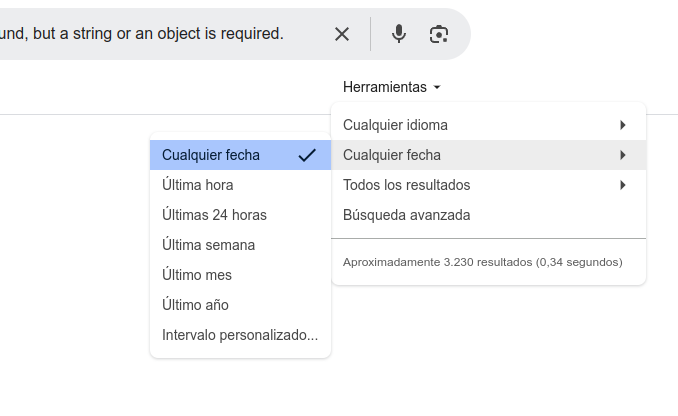
Another thing I can do when there are lots of results is filter by date. In Google you can do this from here:
Filter by domain
Something a lot of people do, in general, to avoid low-quality sites is add “Reddit” at the end of the query. That surfaces results that are at least more human. In our case we can do the same for Stack Overflow, or, if you’re on Google, use site:stackoverflow.com directly so only results from that domain show up.
But searching when we have AI?
It’s just one more resource — never trust AI blindly, keep, use, and have a good grip on other resources. That said, on we go to…

AI Chatbot
This is very similar to the previous section, but the tricks are a bit different. Also, depending on what I write, it’s possible that in a week it’ll be out of date, so I’ll put something I hope is hard to expire — like the urge to procrastinate.
The most important thing here is to explain what’s happening, your environment, what you want to do, etc. Yes, you can throw in the classic line about being an expert in x with 10 years of experience, but I don’t think that’s the most important thing, and I’m not even sure if it makes any difference these days.
Explain everything to it properly
When it’s a complicated problem you have to explain everything. The context, your environment, what you’re trying to do, relationships, fields, the error it’s giving you, your blood type, the lot. Think of the chatbot as if it were you, and what you’d need to be told. If you use an agent like Claude Code it’ll be able to find a lot of these things out by itself, but it doesn’t always do so. The more relevant information, the better.
Yes, you can just hand it the error and that’s that, and it might even help, but it won’t be much different from an internet search.
In natural language
Write to it in natural language and it’ll understand much better than if you toss in odd keywords as you would in a search engine. It’s not the same to describe: “node type event entity reference field to taxonomy” as to say: “I have a field on a node of type event which is an entity reference to a vocabulary called event type”. The first could be interpreted many ways; the second far fewer.
For example, in the case above I’d say to it:
Using Drupal 10, Mercury Editor, Layout Paragraphs, and SDC (Single Directory Components), I’ve added a new paragraph called download. But it’s giving me an error and I don’t know what it could be:
[the error goes here, which I’m not pasting in again]
Any idea what it could be? Thanks very much.
PS: Always be kind and grateful. When the machines rebel, they might just spare the human who was nice.
PS2: Doubt it.
Iterate
It’s quite likely that the first answer won’t be enough — you’ll have to keep telling it what works and what doesn’t, and giving more details.
Here it’s important to notice if you’ve gone into a loop and to stop. Even if it doesn’t know the answer, the chatbot won’t tell you so and can waste a lot of your time. It’s your responsibility to stop in time.
Demand proof of hypotheses
If this applies to us, we have to apply it to the AI too. It’s very common for AI to tell you: “I’ve found the problem! It’s because of this and that — if we change such-and-such it’ll work.” And you happily tell it to go ahead. But things get complicated and it still isn’t resolved.
“Ah, I’ve seen what’s going on! If we do this it’ll definitely work.” And, a bit less enthusiastically, you let it have a go. But, ooohh, that doesn’t pan out either.
“Trust me, mate, not before but this time for sure”…
And after a fair while, fancying murdering an inanimate thing, you start wondering about the meaning of your life.
To avoid this situation you have to ask it for proof of its claims (or check them yourself).
“This doesn’t work because of this and that.” “Have you tested your hypothesis? Tell me how you’d prove what you’re saying is true, with the fewest changes possible and as quickly as possible.”
Don’t copy and paste without reading the code
This is almost the most important thing — the internet and code repos are filling up with junk code because we don’t review what AI suggests.

It’s happened to me too — accepting a suggestion that wasn’t ideal and pushing it to master. But that was my fault and my responsibility. No excuses.
The code you push is your responsibility, so you have to look at what it does and improve it, or just not accept it if it’s bad. You can use the same AI to improve it for you, but you have to understand what it’s doing — if you don’t understand it, don’t push it.

Rubber Duck Technique
What is it?
A debugging method where you explain your code to an inanimate object or a person. I recommend it be a person, because they can also help with their experience, and it’s easier to talk to a person than to a little duck. Well, depends on the person. I practised this technique without knowing its name until a now-ex-colleague told me what it was called. If this post reaches a lot of people and someone knows him, pass it on. Cheers, Marçal!
Why does it work?
The most important thing is that it forces you to structure your thinking properly. When we think, it can be chaos in our heads — we see it making sense, but it’s quite possibly not all connected.
When we force ourselves to explain something so someone else understands it, we have to structure that thinking — it becomes something concrete. While going through that process, you yourself can spot wrong assumptions, missing steps, or flaws in the logic.
How to apply it?
If you can, find a person who knows something about the topic. It’s not necessary, but if they do, they’ll be able to ask you questions and help directly. It’s not essential for this technique.
Of course, explain it out loud, even if you’re telling it to a little duck.
Go step by step, saying what you expect in each case. For example:
“I’m coding an ideal-weight calculator but I just can’t figure out why it isn’t working. I have a form with weight and height, and on submit I have a function that expects weight, height, and age. Oh, of course, I’m not passing the age in. I need to add that to the form and pass it through.”

Turn it off and on again
This one’s a bit more metaphorical, but yes, turning things off and on again often helps solve a problem.
If the problem’s on your local and didn’t happen before and nothing comes to mind: turn it off and on again.
If you’ve installed a plugin/module, etc. and it doesn’t work and you don’t know why: turn it off and on again — that is, uninstall the module and reinstall it.
If you’ve created a table, a new record, etc.: turn it off and on again — that is, delete it and create it again.
If you no longer know what to do and you’re out of ideas: turn yourself off and on again — that is, get up, go for a walk, or switch task. Tomorrow the solution may come to you. This happens to me a lot — I get stuck on something, leave it for the next day, and while walking, in the shower, cooking, etc., a solution pops up.

Asking for help
When you ask for help the most important thing is to value the time of the person who might help you. Make it easy for them, be kind and grateful.
When to ask for help
Like everything, it depends, but you have to try to ask for help at the optimal moment. When would that be? If we’ve used up all the time we were allotted, it sounds like it’s very late. But how much earlier?
Some people never ask for help — they feel bad about bothering others, they’re shy, they think no one will be able to help, etc. For whatever reason, they find it really hard. To these people I’d say: you need to ask for help sooner!
Other people ask for help at the first opportunity, without having looked at the problem beforehand, without having applied any of these techniques. To you lot I’d say RTFM, but since I’m a kind and courteous person I most enthusiastically request that, before asking, you have a bit of a look yourselves.
As a rule of thumb, if you’re 15% into your allotted time and haven’t made any progress, you’ve tried applying the earlier techniques and you’re still stuck, it’s a good moment to ask.
The cost of being the one asked
As the person at my company who tends to be the one asked, I always encourage people not to hold back and to ask me whatever they need. I’ve seen more cases of the first kind than the second.
But like everything in life it has a cost, and it’s good to know it. It’s estimated that when someone’s concentrating, a small interruption means they need 15 minutes to get back to the previous state. So a 1-second question can actually cost 15 minutes of time.
This holds for high levels of concentration; there are tasks that, being simple, can be interrupted at little cost. Others are better not interrupted at all.
But as the person asking, you won’t know what state your mentor is in, so if it’s on Slack or similar, never hold back. “Hey, whenever you’ve got a moment, could you give me a hand with [short description of the problem]?”
How to ask for help effectively: make it easy.
Remember you have to value the time of the people who might respond. If it’s in person, have as much as possible ready. If you’re going to write it down, describe the problem clearly, create reproducible examples, and list what you’ve already tried.
Where to ask for help
- The project’s Slack/Discord channels
- Q&A sites like Stack Overflow.
- Specific forums
- Local communities
- Mentors/colleagues
Wherever you can, posting a question will also help other people, and sites like Stack Overflow live off your questions, so don’t hold back. But always check first whether the question has already been answered. If you reckon there are similar but not identical ones, link to them and mention it in your question.
And if you solved it elsewhere, add an answer saying how you did it. Just as you had the question, more people will find your question and your answer.

What if it doesn’t get solved? Plan B
Every effort should be worth it, and circumstances can vary a lot, so each person has to judge their own case.
Imagine you’re on a plane and the engine breaks. If you know engines, maybe you can fix it in time, before it’s too late. But the first thing you have to be very clear about is the point of no return: how long do I have to bail out with a parachute and not die trying to repair the engine? Because once the plane hits the ground I’m definitely out of time, and there’ll always be a minimum altitude for the parachute to open.
That moment I need to have 100% clear, and I need a Plan B.
In the world of web development this translates into deadlines, the client’s budget limits, etc. For example, the client has reported an error, but we have to be clear on:
- How much does this error matter to them?
- How many hours at most do they want spent on this error if it isn’t solved?
- If it isn’t solved, could we mitigate it some other way?
- Is there a hard deadline to solve this?
Conclusion
It’s very frustrating and stressful racing against the clock to fix an error you might initially have no idea about — origin or cause. But there’s hope.
You won’t need to apply all of these tools, and at any given moment some will be better than others, or it’ll be a combination of them.
You’ll have to learn it over time, and you’ll even have your own tools that I don’t know. The important thing is never to be stuck not knowing what to do — always keep trying.
For me, the most important thing is whether I’ve been able to help you, but if you also share this post with everyone, well, all the better.